How I Built Eat Different With EverAlice Book Builder
Eat Different did not begin as “make me a cookbook.” It began with a much more specific question: what would a cookbook look like if familiar food, sensory preferences, and the energy required to cook were treated as real design inputs?
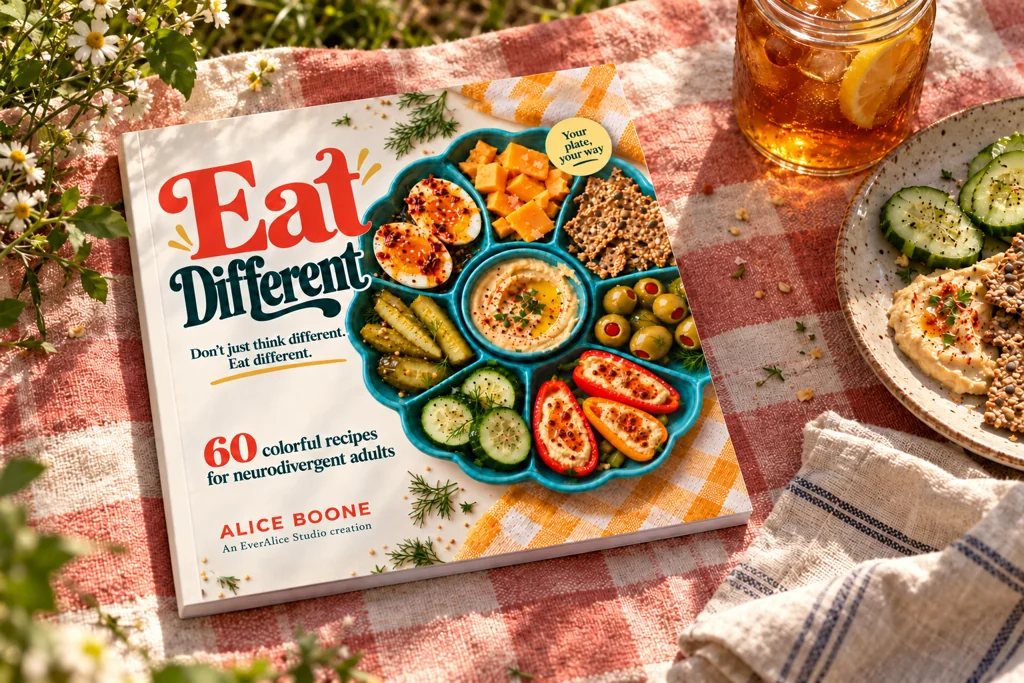
Quick answer
- I started with the reader and the decisions that make cooking hard—not with a generic recipe template.
- I used EverAlice Book Builder to test a small illustrated cookbook sample before treating the design as settled.
- The finished 60-recipe book required hands-on recipe work, editing, layout, indexes, print preparation, and proofing beyond the prototype.
- The current editions are sold through Lulu, not KDP. A KDP edition would need a separate KDP-specific production pass.
A note about the platform
Eat Different is currently sold through Lulu as a square paperback, a landscape hardcover, and a digital PDF. It is not currently an Amazon KDP title.
I kept this article at its original KDP-focused URL because the print-book workflow is useful to KDP creators, but I am not going to pretend the book was published somewhere it was not. Near the end, I explain what would need to change for KDP.
Step 1: begin with the problem the book should solve
I wanted the book to work for people who may like food and still find the path to a meal exhausting. Choosing, checking ingredients, finding the right tools, remembering the next step, managing texture, and thinking about cleanup all happen before the food reaches the plate.
That led to a simple product promise: food should work with your brain, your senses, and the energy you have today. It also gave me a way to say no. If a feature made the cookbook more impressive but harder to enter, it probably did not belong.
The promise shaped the title, tone, photography, recipe structure, indexes, and even which facts needed to appear before the first instruction. This is the part I would never hand off to a generator. The author has to decide why the book exists.
Step 2: turn the promise into a repeatable recipe system
A cookbook becomes usable when readers can predict where information lives. For Eat Different, every recipe needed to answer more than “what are the ingredients?” It needed to help someone decide whether this meal fits today.
The system grew around active and total time, tools, texture expectations, an easier option, and a sensory swap. The full book also needed energy-based finders, an A–Z index, and dedicated gluten-free and no-cook or quick-heat finders in the square paperback.
That structure matters more than any single page. It is the contract between the author and the reader. Once the contract was clear, it could guide both Book Builder and the later hands-on layout work.
Step 3: test three pages before building sixty recipes
The most useful way to test a book is not to produce the whole thing and hope. I used EverAlice Book Builder to make a bounded landscape sample: a cover and two recipe pages.
The sample used the Bright & Calm style and an 11 by 8.5-inch landscape format. The point was not to claim the cookbook was finished. It was to answer practical questions while the project was still small:
- Could the recipe hierarchy fit without shrinking the text into submission?
- Could artwork and editable recipe text share the page cleanly?
- Did the visual direction feel warm and colorful without becoming noisy?
- Could the project leave Book Builder as a usable PDF, editable Word file, portable project, and ZIP?
That small test made the invisible parts of the idea visible. It is much easier to discuss “bright but calm” when you can point to a page.
Step 4: review the sample like an editor, not a proud inventor
The first acceptable output is not automatically the final output. I reviewed text fit, image placement, heading size, reading order, and whether each page still communicated the recipe clearly. One interior image was replaced; the approved cover, other interior artwork, text, and format stayed intact.
That detail matters. A practical book tool should let you fix the weak part without wiping out the decisions that already work. The sample also confirmed that the PDF and editable Word versions held their landscape page structure and that the portable project could reopen in Book Builder for page-level changes.
None of that replaces editorial judgment. It creates a safer place to use it.
What Book Builder did—and what it did not do
| Book Builder helped with | I still owned |
|---|---|
| Turning a short brief into a reviewable page plan | The purpose, audience, claims, and creative direction |
| Testing landscape pages and coordinated styling | Recipe decisions, testing, editing, and food-safety language |
| Keeping artwork separate from editable text | Choosing what readers needed on every recipe |
| Exporting PDF, editable Word, portable project, and ZIP files | Full-book layout, indexes, final edition differences, and printer preparation |
| Replacing one image without remaking the approved pages | Reviewing every page and accepting responsibility for the finished book |
This is the honest value of Book Builder for me: it shortened the distance between an idea in my head and something concrete enough to review. It did not remove authorship.
Step 5: build the full content, not just a beautiful sample
The finished cookbook contains 60 recipes: 46 savory choices and 14 desserts. Some are simple plates and quick meals. Others are for days when cooking sounds enjoyable. Twenty recipes are marked GF when made with labeled gluten-free ingredients.
That scale required work the three-page prototype could not do for me. Recipes needed coherent measurements and instructions. Easier options and sensory swaps had to be useful rather than repetitive. Ingredient notes, storage reminders, allergens, and finders had to agree with the recipe pages.
The recipes use no peanut ingredients, but tree nuts and other allergens are present. A GF mark is a starting point for checking labels and cross-contact, not a promise that every packaged ingredient is safe for every reader. Those distinctions are editorial responsibilities, not decorative copy.
Step 6: make the page system visible
Readers should not have to take my word for the book. The page system is easier to understand when you can see it, so the cookbook page uses actual paperback previews rather than only polished mockups.
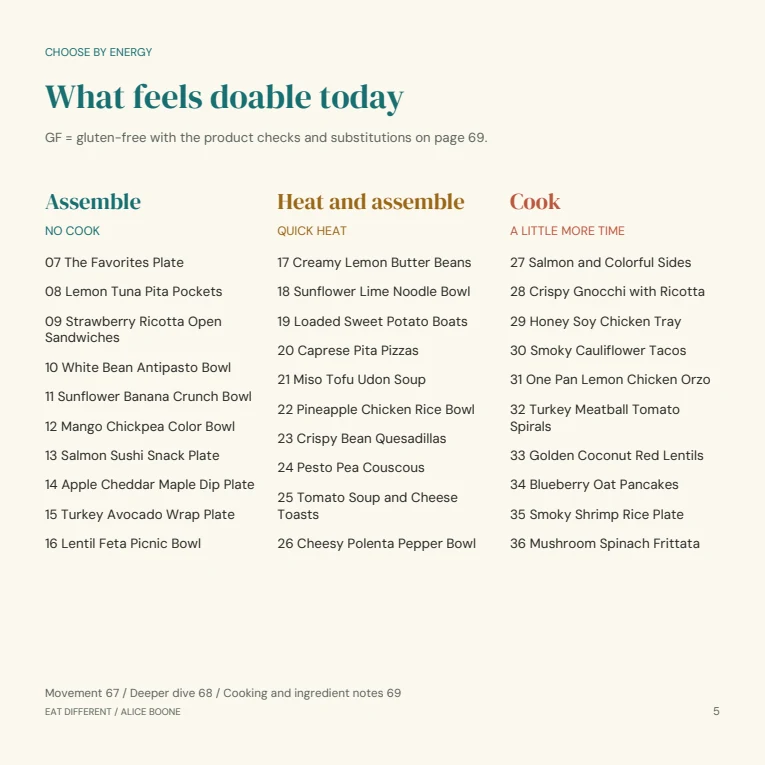
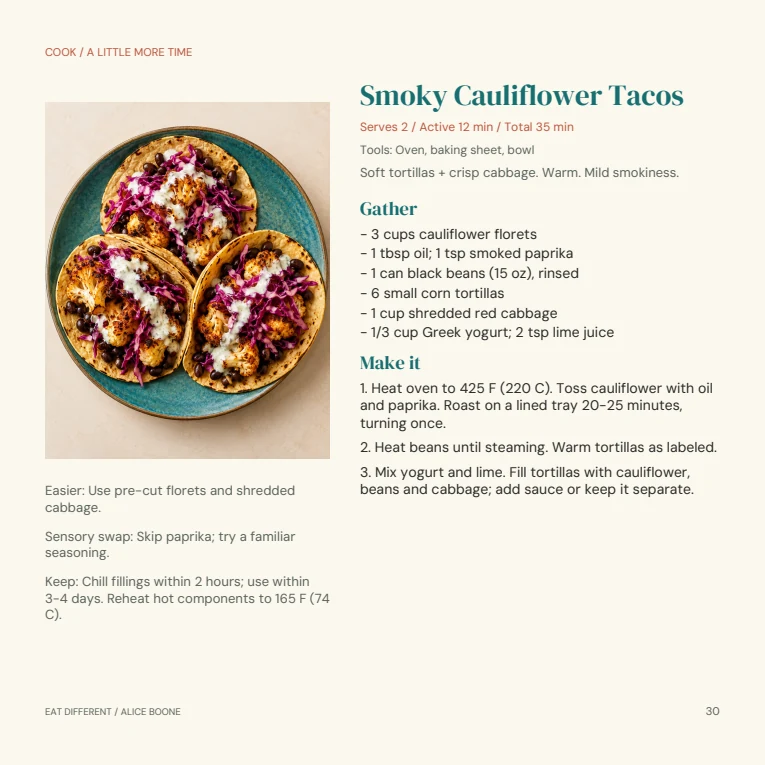
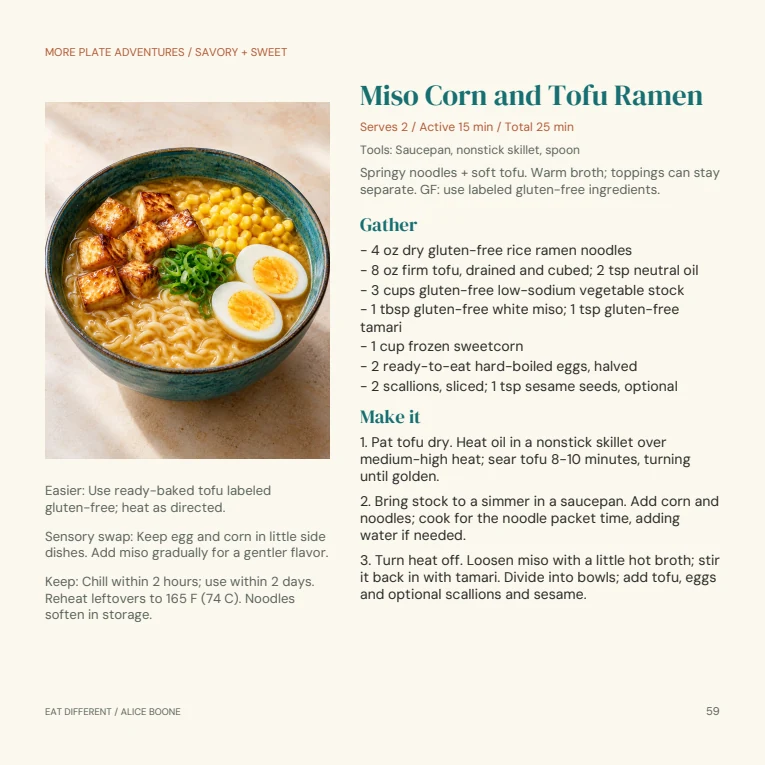
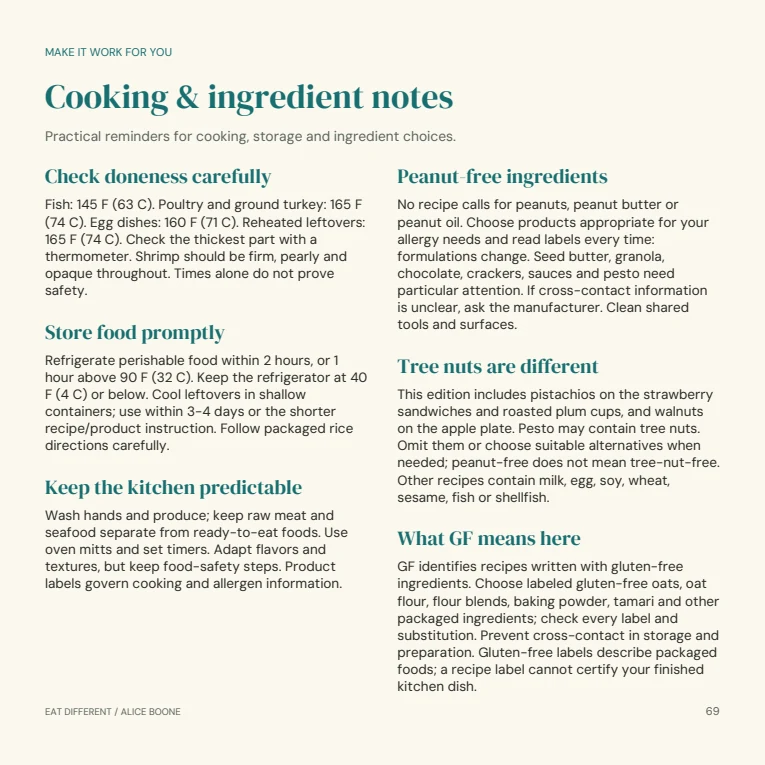
These pages show the real hierarchy: a way into the book, a recipe with an easier option and sensory swap, and the practical notes that support safer use.
Step 7: adapt one book into three honest editions
The same 60 recipes now appear in three editions, but the files are not identical.
- Square paperback: 72 pages at 8.5 by 8.5 inches, with a color interior and glossy softcover.
- Landscape hardcover: 68 pages at 11 by 8.5 inches, with premium color and a glossy hardback.
- Digital PDF: 68 landscape pages for reading on a screen.
The layout and cover design change with the edition. That is not a nuisance to hide; it is what happens when the same content has to work as an everyday kitchen copy, a larger shelf edition, and a digital file.
I used additional editing tools and hands-on layout and print preparation after the EverAlice work. The finished book is the result of those stages together.
Step 8: proof the object, not only the PDF
A print-ready-looking PDF is still not a physical cookbook. The printed object adds paper, binding, gutters, color shifts, trim tolerance, and the question of whether somebody can comfortably use the page in a kitchen.
I checked the final page order, recipe hierarchy, image quality, margins, and edition details. Physical proofing is where a design can stop being a screen composition and start behaving like a book.
This is also why I would not market Book Builder as a substitute for proofing. It can make a stronger file and a more editable process. The printer and the physical copy still get a vote.
What would change for Amazon KDP?
If I made a KDP edition, I would begin with the finished content and visual system—not simply upload one of the Lulu files and hope. KDP has its own supported trim sizes, page-count rules, bleed setup, cover calculations, metadata fields, preview process, and proof workflow.
KDP currently requires a PDF for an interior with bleed, asks for single pages rather than spreads, and specifies images of at least 300 DPI. Its paperback cover is a separate full-wrap file containing the back, spine, and front. The final cover width depends on page count, paper, and ink choices.
The sequence would be: choose the KDP format, adapt the interior, stabilize the page count, generate the official cover template, build the full wrap, check the metadata and AI-content disclosure requirements, use Print Previewer, and order a proof. Book Builder can support the project, but KDP remains the final authority on its files.
Step 9: show the finished work without hiding the useful details
The Eat Different cookbook page includes the actual page previews, edition sizes, page counts, prices, and buying links. It also says clearly that each edition is sold separately through Lulu and that print shipping and taxes are calculated there.
That transparency is part of the product. A beautiful mockup can help someone imagine the book, but real pages help them decide whether the book fits how they read and cook.
The separate story, Why I Made Eat Different, focuses on the people and food choices behind it. This walkthrough focuses on how the idea became a working book.
The result
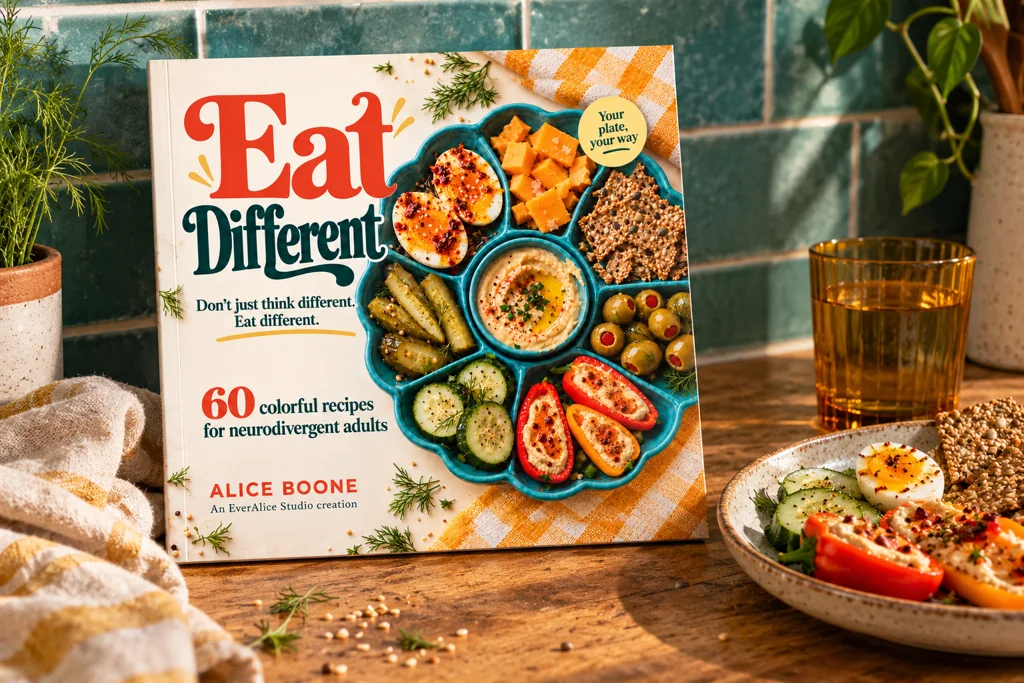
Eat Different became a real 60-recipe cookbook because the tool and the author had different jobs. EverAlice helped me test the structure, art direction, editable pages, and exports. I was still responsible for the book's point of view, recipe system, editing, safety language, finished layouts, and proofing.
See inside Eat Different and choose an edition
Explore EverAlice Book Builder
Frequently asked questions
Was Eat Different published through Amazon KDP?
No. It is currently sold through Lulu as a square paperback, landscape hardcover, and digital PDF. The process is relevant to KDP creators, but a KDP edition needs its own current format, cover, metadata, preview, and proof checks.
Was Eat Different made entirely by AI?
No. It combined my concept and creative direction, AI-assisted work in EverAlice Studio, additional editing tools, recipe and content decisions, hands-on layout, and print preparation.
How was Book Builder used?
I used it to test the cookbook as a small illustrated landscape project before the full publication work. The test included a cover and two recipe pages, coordinated styling, direct PDF and editable Word exports, a portable project, and one controlled image replacement.
Can EverAlice Book Builder make a KDP cookbook?
It can help plan and assemble the project. You still need to choose a supported KDP format, verify the current specifications, review every page, create the correct full-wrap cover, use KDP's previewer, disclose AI-generated content when required, and ideally order a proof.